Introduction
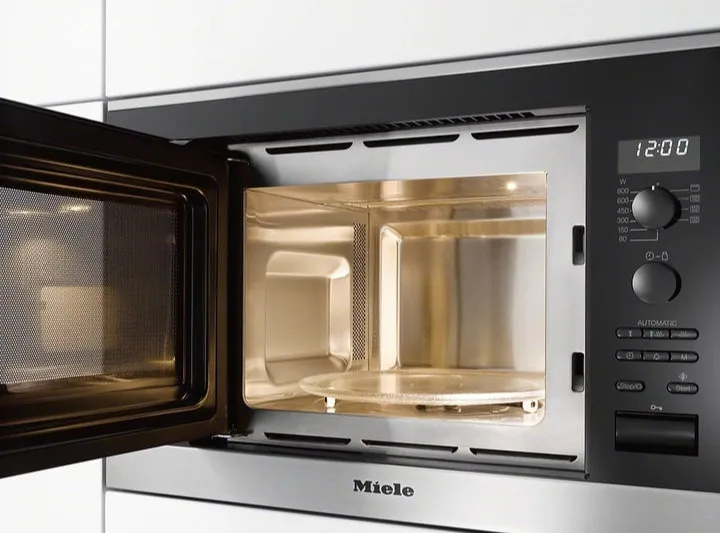
Miele microwave ovens are designed to deliver fast, convenient heating with precise control and reliable everyday performance. Whether the appliance is used for reheating, defrosting, or combination cooking, regular use can eventually lead to wear, electrical faults, or mechanical problems that affect normal operation. This guide outlines the most common microwave issues and explains how to identify likely causes and practical next steps.
Microwave Not Heating Properly
A microwave that runs but does not heat food is one of the most common and frustrating problems. If the interior light comes on, the display works, and the turntable rotates but the food remains cold, the issue may involve the high-voltage components responsible for producing microwave energy.
Before assuming a major failure, confirm that the unit is not set to a special mode such as demo mode, low-power operation, or a timer-only function. It is also worth testing with a cup of water for a short heating cycle, since some foods can make weak heating less obvious at first.
If heating performance is inconsistent, the magnetron, high-voltage diode, or capacitor may be weakening. In some cases, a failing door switch can also interrupt the heating circuit even though the appliance appears to run normally. A microwave that heats intermittently, stops mid-cycle, or takes much longer than usual to warm food may be showing early signs of component failure.
Turntable Not Rotating
The turntable helps distribute microwave energy more evenly around the food. When it stops turning, heating can become uneven, leaving hot spots and cold areas in the same dish. Start by removing the glass tray and roller ring and checking for food residue, grease buildup, or small objects that may be obstructing movement.
Make sure the tray is seated properly on the drive coupler. If it is misaligned, the motor underneath may turn without moving the glass plate. Cracks or warping in the tray can also prevent smooth rotation.
If the tray and support ring are clean and correctly positioned but the turntable still does not move, the drive motor or coupler may be worn. A grinding noise, hesitation, or jerky movement often points to a mechanical issue below the tray.
Sparking or Arcing Inside the Cavity
Sparking inside a microwave should never be ignored. Arcing may occur if metal utensils, foil, twist ties, or dishes with metallic trim are placed inside the cavity. Even a small hidden metal element in a plate design can create visible sparks during operation.
If no metal is present, inspect the interior walls and waveguide cover for burnt food splatter, grease accumulation, or damage. Carbonized residue can conduct electricity and cause repeated arcing. Cleaning the cavity thoroughly with a mild non-abrasive cleaner often resolves minor issues caused by baked-on debris.
A damaged waveguide cover is another possible cause. If this protective panel becomes scorched, cracked, or softened, it can no longer shield internal microwave pathways properly. Continued use in that condition may lead to further internal damage.
Door Problems and Safety Switch Issues
Microwave doors do more than close the cavity. They are part of the safety system that prevents operation when the unit is not properly sealed. If the door does not latch securely, the microwave may fail to start, stop unexpectedly, or behave inconsistently during a heating cycle.
Inspect the latch area for crumbs, grease, or broken plastic parts. Sometimes the issue is as simple as debris preventing the door from closing completely. If the door feels loose, uneven, or difficult to close, the hinges or latch mechanism may be worn.
Door switch problems are also common. A unit may appear to power on but refuse to begin cooking, or it may shut off when the door is moved slightly during operation. Repeated opening and closing over time can wear the switches and create unreliable contact. Because these switches are tied directly to safe operation, any persistent door-related fault should be addressed promptly.
Control Panel and Display Malfunctions
When the control panel becomes unresponsive, the problem may range from simple surface contamination to a deeper electronic failure. Grease, moisture, or cleaning product residue on touch controls can interfere with input and create delayed or incorrect responses.
If the display flickers, shows incomplete characters, or resets unexpectedly, the appliance may be experiencing a power supply problem or control board instability. Temporary electronic glitches sometimes clear after disconnecting power for several minutes and restarting the unit.
Buttons that respond only intermittently or require repeated pressing may point to a worn membrane keypad or failing control interface. If multiple functions stop responding at the same time, the main control system may be affected rather than a single button.
Interior Light, Fan, and Noise Issues
A microwave may still operate even if the interior light stops working, but that symptom can sometimes appear alongside other electrical problems. If the light fails on its own, the bulb or lamp housing may simply need attention. If the light, fan, and heating performance all change at the same time, the fault may be broader.
Unusual noises also deserve attention. A low hum is normal during operation, but loud buzzing, rattling, or grinding is not. Rattling can come from a loose turntable or internal panel, while grinding often points to the turntable motor. A harsher electrical hum may indicate trouble in the high-voltage system, especially if heating performance has also declined.
Cooling fans are important because they help control internal temperatures. If the fan becomes noisy, runs erratically, or fails to operate, the microwave may overheat and shut down prematurely.
Maintenance Recommendations
Regular cleaning is the most important step in keeping a microwave working properly. Wipe interior surfaces frequently to prevent food splatter and grease from hardening. Pay special attention to the ceiling, door seals, and waveguide cover area, since residue in those places can lead to arcing or odor buildup.
Clean the turntable, support ring, and tray recess regularly so the rotating parts move freely. Avoid slamming the door, as repeated impact can wear hinges, latches, and safety switches faster. It is also wise to use only microwave-safe cookware and to avoid decorative dishes with metallic trim unless they are specifically marked as microwave compatible.
For built-in models, keep ventilation openings clear so heat can escape properly. Restricted airflow can shorten component life and contribute to overheating. With routine cleaning, careful use, and prompt attention to unusual noises or heating changes, a Miele microwave can continue to perform reliably for everyday cooking tasks.